 Nuclideon
 Viewsheds

A view shed is the set of all points that are visible from a location. It includes all points that are in direct line of sight to the location and excludes points that are obstructed by terrain and other features.
Creating a Viewshed
- Right-click a point in the scene, choose Add New Item and then Add View Shed.
- Click the Add View Shed button in the toolbar (or press Ctrl+V).
It should look something like below, where visible points are green and hidden are red.
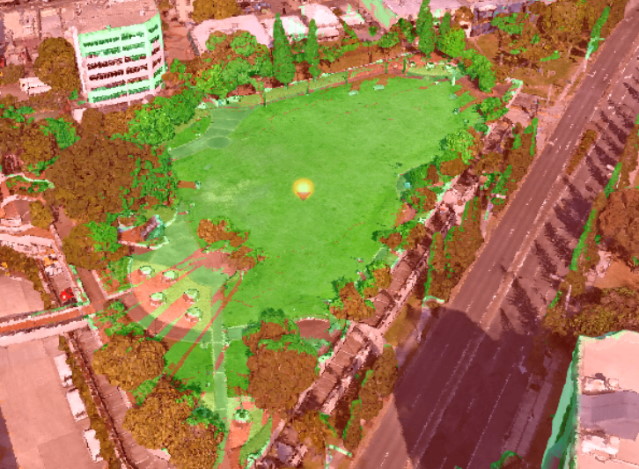
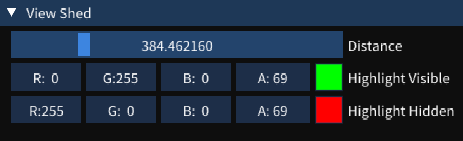
Ribbon Settings
Basic
- Distance: The projection distance of the viewshed in metres (100–3000 m). Points beyond this distance are not analysed.
Style
- Visible Colour: The colour used to highlight points that are visible from the viewshed origin.
- Hidden Colour: The colour used to highlight points that are occluded (not visible) from the viewshed origin.
Scene Explorer Settings
Expanding the viewshed in the Scene Explorer shows the distance and colour settings described above. The Gizmo can be used to reposition the viewshed origin.
Right-Click Context Menu
| Option | Description |
|---|---|
| Edit Name | Rename the item. |
| Move To | Move the camera to the viewshed origin. |
| Remove Item | Delete the item from the scene. |
Scene Node Metadata
| Key | Type | Description |
|---|---|---|
distance | double | Viewshed projection distance in metres (100–3000). |
visibleColour | uint | Colour for visible points (BGRA packed). |
hiddenColour | uint | Colour for hidden/occluded points (BGRA packed). |