 Nuclideon
 Filters
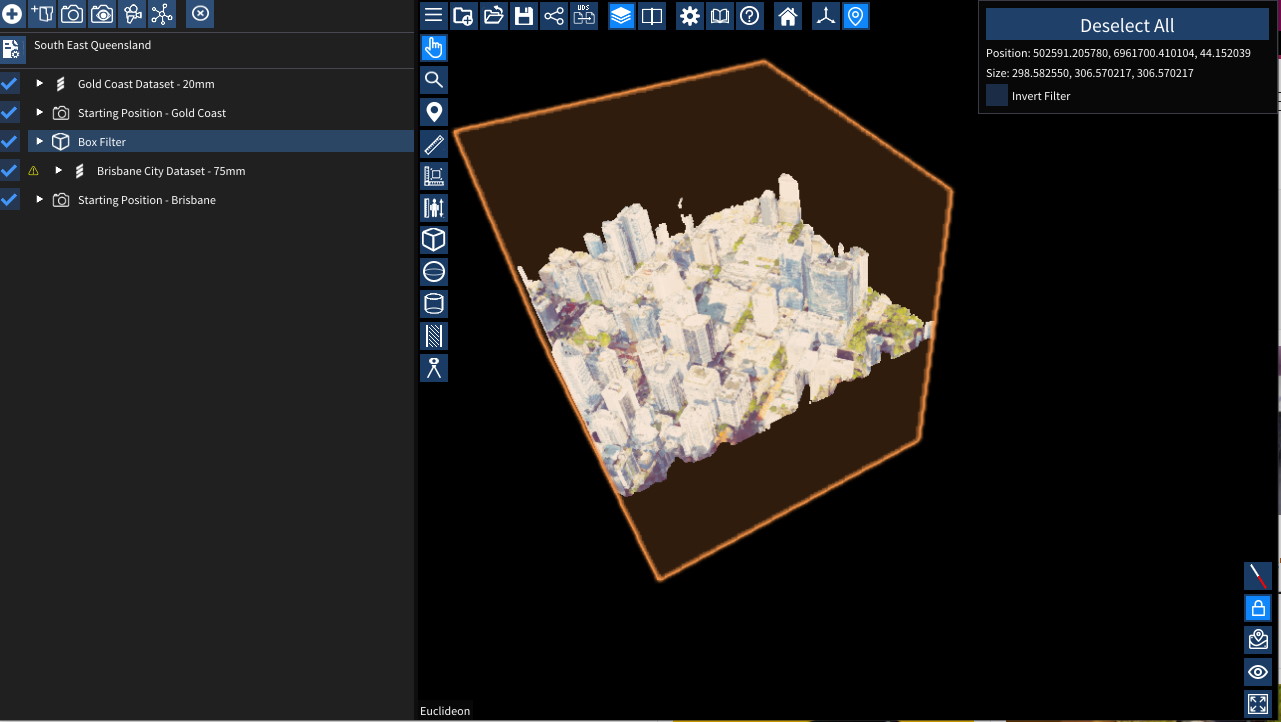
The various filters can be used to filter out voxels of the UDS files in the scene or during export. You can change the position, rotation, and size of the filter by setting the appropriate values in the scene explorer. You can also use the gizmos to adjust the transforms.
Tips for using filters
- The filter only applies to UDS files that are further down the list in the same folder (or subfolders) in the scene explorer.
- In the screenshot above, the "Brisbane City Dataset - 75mm" is filtered using the "Box Filter" but "Gold Coast Dataset - 20mm" is not as the Gold Coast dataset is above the Box Filter.
- The "CSG Operation" allows for complex filtering
- Union will show voxels that match this filter OR the previous filter
- Intersection will show voxels that match this filter AND the previous filter
- Replace will override the previous filter and use this one for future models
- Filter Types:
 Box Filter
 Sphere Filter
 Capsule Filter
 Cross Section Filter
Inverting the filters will remove everything outside the filter.
Exporting using filters
To export the filtered data, right-click on the model you want to export in the Scene Explorer. Choose Export Pointcloud, then choose the filter you want to export if you have more than one.
If the "Export Pointcloud" Option doesn't appear, ensure that you are using the model's projection by double clicking the model in the Scene Explorer, or right clicking the model in the Scene Explorer and selecting "Use Projection".
Creating Filters
| Tool | Shortcut | Description |
|---|---|---|
| Box Filter | I | Add a box-shaped filter. |
| Sphere Filter | J | Add a sphere-shaped filter. |
| Capsule Filter | K | Add a capsule-shaped filter. |
| Cross Section | O | Add a cross-section slice filter. |
Filters can also be added by right-clicking a point in the scene and choosing Add New Item.
Ribbon Settings
When a filter is selected, the ribbon tab shows:
Filter (Box, Sphere, Capsule)
- CSG Operation: How this filter combines with the previous filter:
- Replace: Override the previous filter.
- Union: Show voxels matching this filter OR the previous filter.
- Intersection: Show voxels matching this filter AND the previous filter.
- Inverted: Invert the filter to show voxels outside the filter shape.
Cross Section
- Width: The thickness of the cross-section slice in metres (0–1000 m).
- Heading: Rotation of the cross-section plane around the vertical axis.
- Pitch: Tilt angle of the cross-section plane.
- Inverted: Show only voxels outside the slice.
Scene Node Metadata
Box / Sphere / Capsule Filter
| Key | Type | Description |
|---|---|---|
shape | string | Filter shape type (set automatically by item type). |
mergeMode | string | CSG operation: replace, and (intersection), or or (union). |
inverted | bool | Invert the filter to exclude the interior. |
Cross Section Filter
| Key | Type | Description |
|---|---|---|
width | double | Thickness of the cross-section slice in metres (0–1000). |
inverted | bool | Invert the filter. |
transform.rotation.h | double | Heading rotation of the cross-section plane in degrees. |
transform.rotation.p | double | Pitch rotation of the cross-section plane in degrees. |